Admin portal
Your whole training business, in one place
Clients, trainers, courses, bookings, certificates and invoices all sit behind one login. Enter things once and CertSlate carries them through.
- Included on every plan
- Import from a spreadsheet
- Admin and trainer roles
Start the day knowing what needs doing
Most training companies run on a calendar, a spreadsheet, a folder of certificates and an accounts package, and the gaps between them are where things go wrong. A booking is confirmed but the trainer is never told. A certificate expires and nobody notices.
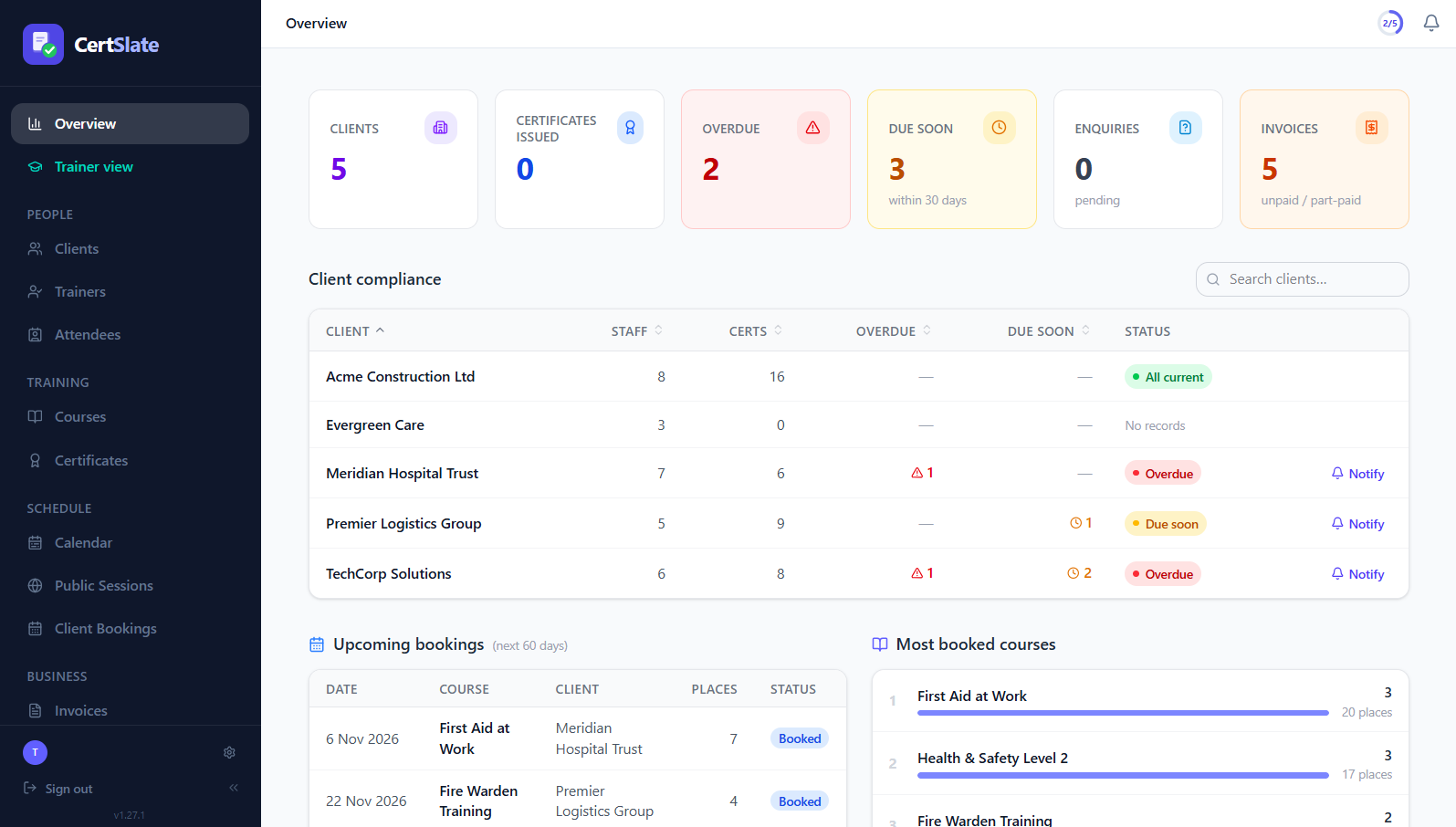
The admin portal is the one place where all of it connects. The menu follows the way you work: people, training, schedule, business. Open a booking and the register, the certificates and the invoice are right there.
-
The menu
People, Training, Schedule and Business, in the order you use them
-
Roles
Admins run the business. Trainers see only what they need.
-
Your records
Bulk import clients and staff from a spreadsheet to get going
What is in the menu
Built around the way a training company works
People
Clients and their staff, your trainers, and every attendee, each with their training history and compliance status.
Training
Your course catalogue and every certificate issued, with the designs that make them.
Schedule
A calendar of everything, plus Public Sessions for open courses and Client Bookings for private ones.
Business
Invoices, payments, analytics and feedback, so you can see whether the training pays.
Compliance reports
See which staff are valid, due soon or overdue across all your clients.
Settings that make it yours
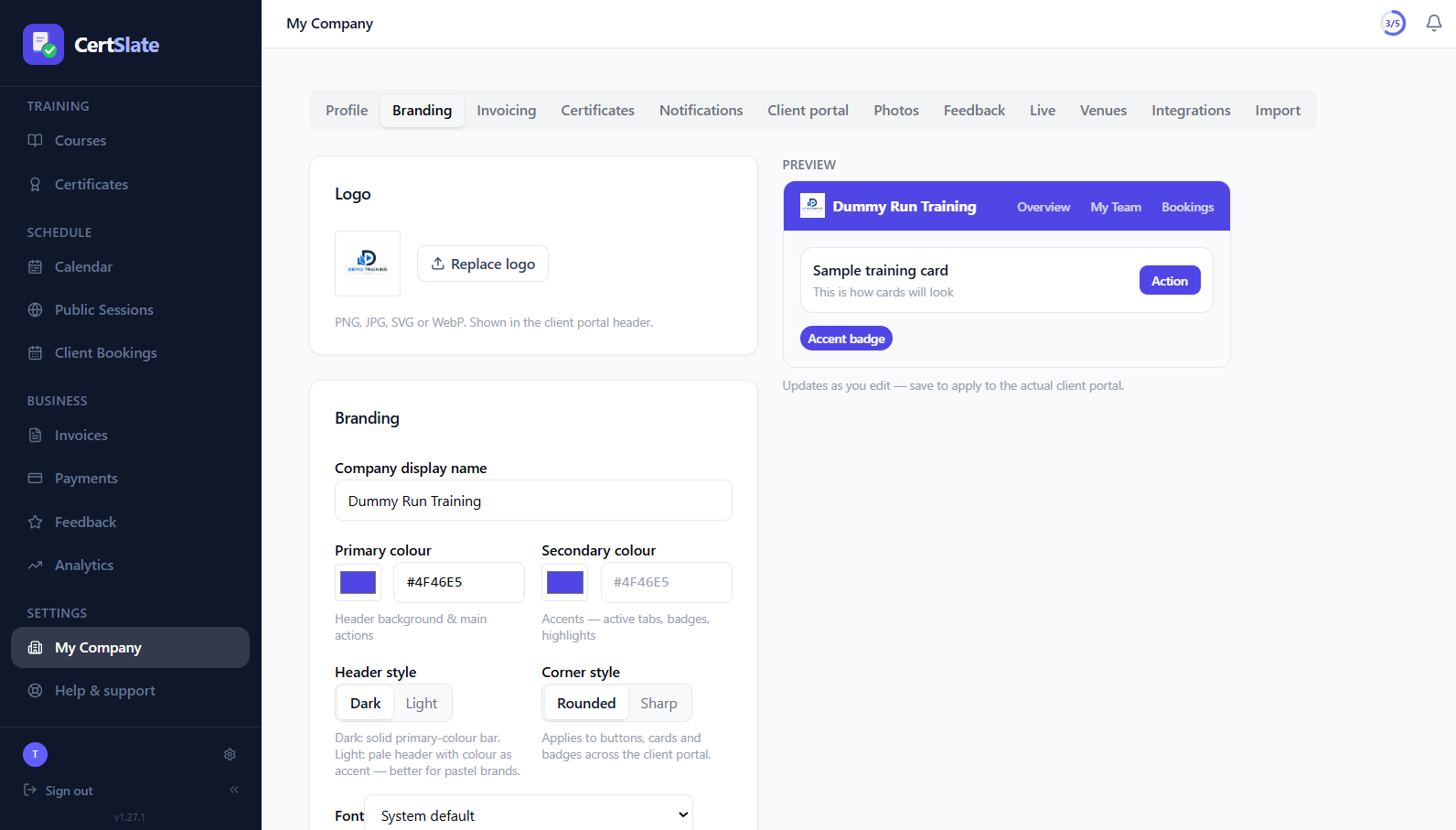
Branding, notifications, invoicing, integrations and how much your clients can do for themselves.
One booking, start to finish
Enter it once and it flows through
This is what happens behind a single booking. You do the first step. CertSlate does most of the rest.
- 1
Take the booking
A client request or an enquiry becomes a booking with a date, trainer, venue or online link, and attendees.
- 2
The trainer runs the day
They see it in their own portal, take the register and end the session when it is over.
- 3
An admin completes it
Check the register and confirm who passed. Training records are created and certificates are issued and sent.
- 4
Invoice the client
Create the invoice from the booking, or bundle several bookings onto one.
Nothing slips
It tells you before it becomes a problem
You should not have to go looking for what is overdue. CertSlate puts it in front of you and nudges the right people.
-
A weekly digest Upcoming bookings, training about to expire, pending enquiries and overdue invoices, in your inbox.
-
Expiry reminders Staff are reminded before a certificate runs out, and so are their client managers.
-
Overdue invoice alerts See what has not been paid, and send a reminder with your bank details already on it.
Settings
Make it look and work like your company
A few settings do a lot of the work.
-
Your brand on everythingLogo, colours, header style, corners and font, with a live preview. It carries into the client portal, emails and certificates.
-
Decide what clients can doSet defaults for the whole company, then override them for any one client.
-
Admins and trainersTrainers get their own trimmed-down portal. An admin who also teaches can switch to it with one click.
-
Get your data inBulk import your clients and staff from a spreadsheet instead of typing them.
Questions people ask
Can trainers see everything?
No. Trainers have their own portal with their schedule, calendar, courses, registers and feedback. They do not see invoices, other trainers’ work or your company settings.
Can an admin also be a trainer?
Yes. If you teach as well as run the business, a Trainer view link switches the whole menu to what a trainer sees, and Back to admin takes you home.
How do I get my existing records in?
Import your clients and staff from a spreadsheet, then add training history in bulk so each person is up to date from day one.
Is the admin portal the same on every plan?
Yes. Pro adds things like Stripe payments, Xero, analytics and QR certificate verification. See the pricing page for the full list.
Talk to us
Got questions? Want to know more?
We would love to talk. Leave your number and we will ring you back to answer questions, show you around, or talk through how CertSlate would fit your business.
- A real person, not a sales script
- We aim to reply within one working day
- Happy to do a demo with your own courses in mind
Request a call
Tell us who you are and when suits you.