Bookings and sessions
Private client bookings and open public sessions, side by side
Some training is for one client’s team. Some is open to anyone. CertSlate handles both, with the right rules for each, in one calendar.
- Both on every plan
- In person or online
- Card payment on Pro
Two kinds of training need two ways of booking
When a care home books eight staff onto first aid, you agree the date, the trainer and the venue with one person. When you sell places on an open course, strangers book and pay for themselves. Squeezing both into one list makes a mess of each.
CertSlate keeps them apart where it matters and together where it helps. Client Bookings and Public Sessions have their own pages and their own rules, but they share one calendar, one register, one certificate process and one invoicing flow.
-
Client Bookings
A client’s own staff, on dates you agree
-
Public Sessions
Open to anyone, with places and a price per person
-
Shared
One calendar, registers, certificates and invoices
Which one do you need?
Client Bookings
Training for a client’s team
You and the client agree a date. Their staff are the attendees.
- Clients request bookings from their portal, or you create them
- Assign a trainer, a venue or an online link
- Booking confirmations go to the contact, every manager and each booked person
- Invoice the client, or bundle several bookings onto one invoice
- Training records count towards the client’s compliance
Public Sessions
Open courses anyone can book
You set the date, the places and the price. People book themselves.
- A public booking page with no login needed
- Always priced per person, with places counting down
- Take card payment at booking with Stripe Connect (Pro)
- Show sessions on your own website with the widget (Pro)
- Clients can book their own staff on from their portal
Every plan includes both. In the admin menu they are called Client Bookings and Public Sessions, each with a short description to help new team members.
A client booking
From request to confirmed
- 1
The request arrives
A client manager asks for a course and a date from their portal, or you take the call and add it yourself.
- 2
You confirm the details
Pick the trainer, the venue or online link, and the attendees. Clashes are flagged.
- 3
Confirmations go out
The contact, every client manager and each booked person get the details, and a later change sends everyone an update.
- 4
Reminders follow
People are reminded before the day, so there is less chasing for you.
Public sessions
Open courses that fill themselves
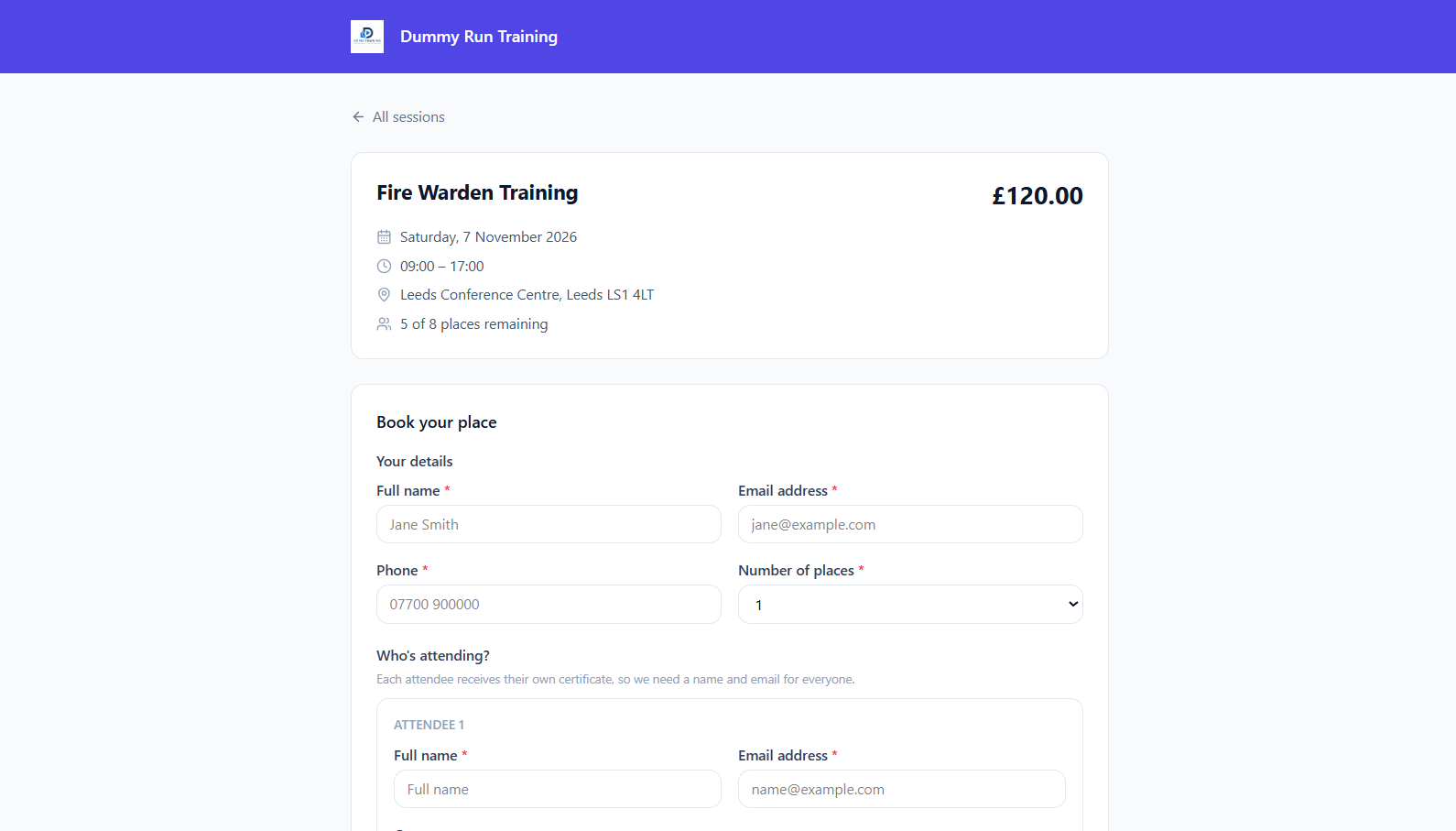
Publish a session and share the link, or show it on your website. People see the date, the place, the price and how many places are left.
-
Priced per person Public sessions are always per person, so the maths stays simple for you and for them.
-
Pay at booking Pro Connect your own Stripe account and take card payment as people book.
-
Add people yourself Type attendees in, or pick a client and tick its staff. Each gets their own booking.
-
Record training that already happened Create a session in the past, add who attended and issue certificates, so your back catalogue is on file.
Details that save time
The small things that add up
Online sessions
Mark a session online with a joining link and instructions. The link is only sent to people with a confirmed booking.
Venues
Save venues once. Address search follows your country and fills in the state for US addresses.
Multi-day courses
A course can run over several days, or one day or two half-days. New bookings are pre-filled from the course.
One invoice, several bookings
Bundle a client’s bookings onto a single invoice instead of one per course.
Duplicate attendees
Merge duplicates through a side-by-side comparison, with a warning when they might be two different people.
Editing is safe
Changing a booking adds or removes only the people you changed. Everyone else’s attendance stays put.
Client portal
Let clients book their own staff onto your open sessions
A client manager sees your upcoming public sessions, picks which of their staff to book, and the places are confirmed straight away. Each person is linked to their staff record, so the training counts towards that client’s compliance.
See the client portalQuestions people ask
Do I need Pro to take public bookings?
No. Public booking pages are on every plan. Pro adds card payment at the point of booking and the widget that shows sessions on your own website.
Can I run a course online?
Yes. Mark any session or booking as online and add the joining link and instructions. The link goes only to people with a confirmed booking.
Can I record training from before I joined CertSlate?
Yes. Sessions can be dated in the past, so you can add who attended and issue certificates for your back catalogue.
What happens when a booking is completed?
An admin confirms who passed, then CertSlate creates the training records and issues the certificates. A completed booking is final, though attendance can still be corrected and every correction is recorded.
Talk to us
Got questions? Want to know more?
We would love to talk. Leave your number and we will ring you back to answer questions, show you around, or talk through how CertSlate would fit your business.
- A real person, not a sales script
- We aim to reply within one working day
- Happy to do a demo with your own courses in mind
Request a call
Tell us who you are and when suits you.