Attendance and registers
Registers that fill themselves in
Attendees scan a QR code to sign in. Trainers take the register. An admin completes the booking and certificates follow, with a record of every change.
- QR sign-in on every plan
- No app to install
- Optional photos and ID checks
The paper register is the weakest link in your records
A clipboard going round the room produces illegible names, missing emails and a pile of paper to type up later. And if the register is wrong, so is the certificate.
With CertSlate the register is part of the booking. People sign in on their own phones, the trainer checks it over, and what gets recorded is what the certificate and the training record are built from.
-
Sign-in
Scan a QR code, enter a name and email. No account needed.
-
Matching
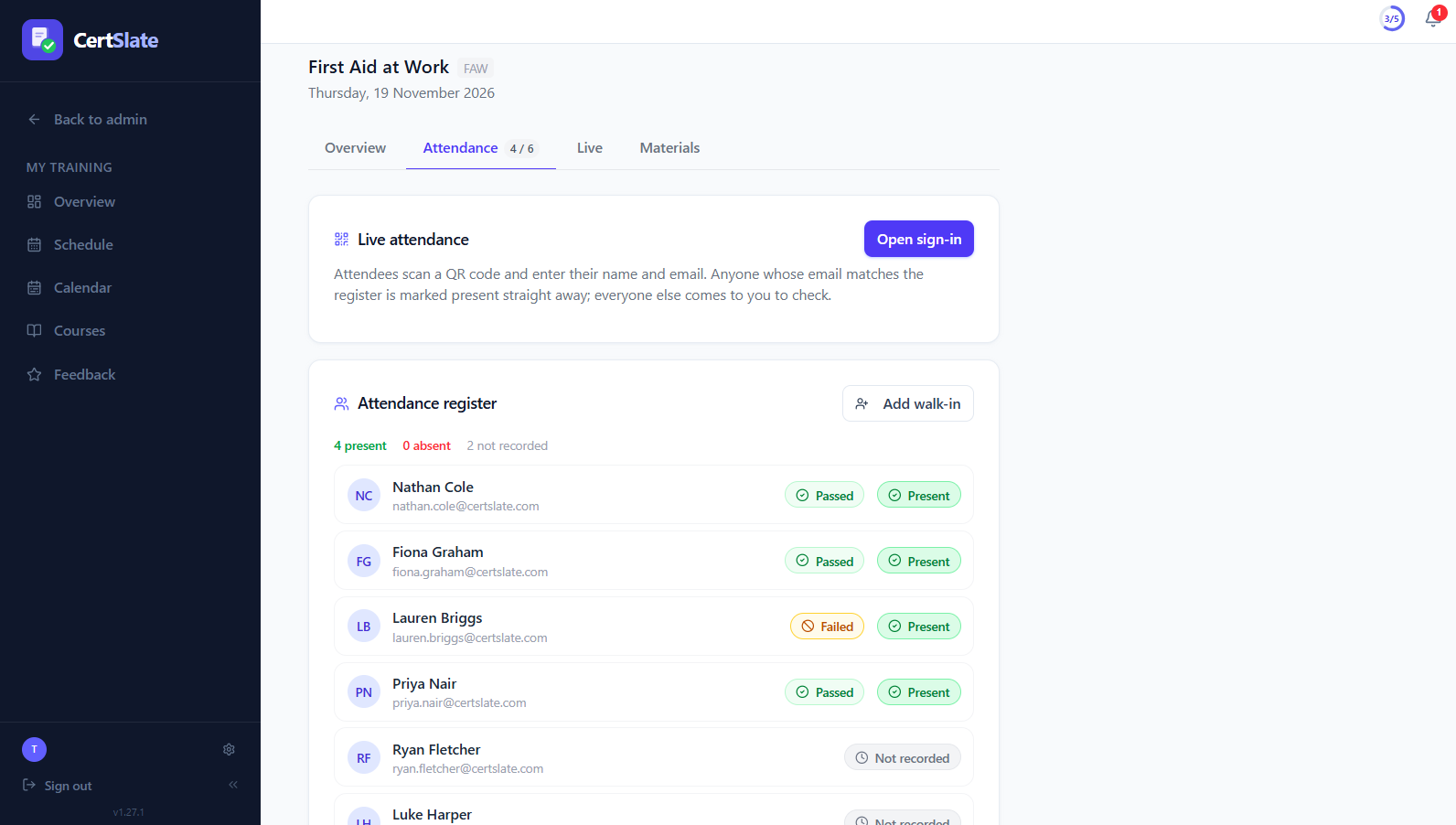
An email that matches the register marks someone present straight away
-
Outcome
Attendance and pass or fail are recorded separately
QR sign-in
How sign-in works on the day
- 1
The trainer opens sign-in
One click on the booking or session register. The QR code can fill the projector on a page of its own.
- 2
Attendees scan and sign in
They enter their name and email on their own phone. Where your company uses photos, a selfie too.
- 3
Matches are marked present
Someone whose email is on the register is marked present immediately.
- 4
The trainer settles the rest
Name-only matches and people not on the list wait for the trainer to confirm, add as a walk-in, or dismiss.
The register
Attendance and pass or fail, kept apart
-
Present is not the same as passed Marking someone present defaults them to Passed, and you can change it. A failed attendee is left out of certificate issuing.
-
Walk-ins are quick Add a walk-in from the client’s staff list, which shows who is available as soon as it opens.
-
Admins complete the booking Trainers end the session. An admin then confirms who passed, and CertSlate creates the training records and issues the certificates.
Optional, and off by default
Photos and ID checks for the courses that need them
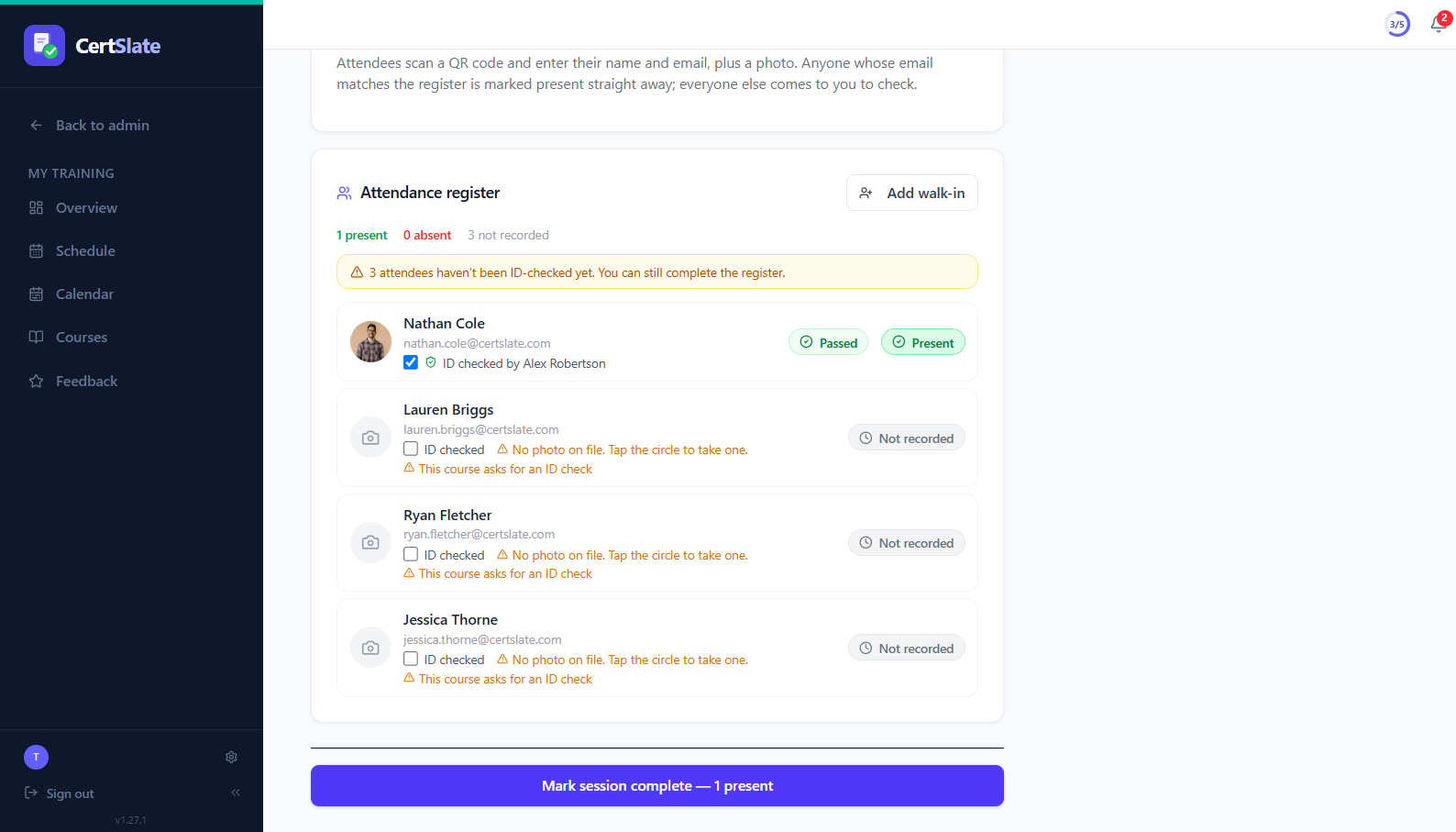
Some training needs you to be sure that the person in the room is the person on the certificate. Photos are there for that, and only when you switch them on.
-
See who is whoTrainers see each attendee’s photo on their register, and can take or replace one with the phone camera.
-
Tick “ID checked”Who checked and when is recorded. A course setting prompts trainers to check, but never stops anyone being marked present.
-
Handled carefullyPhotos are stored privately, cropped, stripped of camera and location data, and never given a public link. There is no facial recognition.
-
Your choice on certificatesYou can show the holder’s photo when a certificate’s QR code is scanned. It is off by default.
When something is wrong
Mistakes get fixed, and the fix is on record
-
Correct a completed booking Change attendance, pass or fail, or the ID check from the booking’s attendance list.
-
It asks before it deletes If a correction means someone should not have been certified, you confirm first, and their record and certificate are removed.
-
Everything is logged A History card shows what changed, who changed it and when.
Questions people ask
Does sign-in need Live or a particular plan?
No. QR sign-in is on every account, whether or not CertSlate Live is switched on.
Do attendees need to install anything?
No. They scan the code with their phone camera and a web page opens.
Do I have to use photos?
No. Photos are off until you switch them on in Settings, after accepting the Data Processing Terms. Each training company also gets a public photo notice page, which the booking page links to when photos are on.
What if someone signs in with a typo?
A name-only match or an unknown person goes to the trainer, who can confirm them, add them as a walk-in, or dismiss the sign-in.
Talk to us
Got questions? Want to know more?
We would love to talk. Leave your number and we will ring you back to answer questions, show you around, or talk through how CertSlate would fit your business.
- A real person, not a sales script
- We aim to reply within one working day
- Happy to do a demo with your own courses in mind
Request a call
Tell us who you are and when suits you.