CertSlate Live New
Turn every session into a conversation
Quizzes, polls, word clouds and Q&A on your attendees’ own phones. They scan a QR code to join. No app to install and no account to create.
- Included on every plan
- Join by QR or 6-digit code
- Results saved to the booking
Prepare once, run it every time
A good trainer already asks questions. The trouble is that the same three people answer them. Live gives the whole room a voice and gives you evidence of what was learned, rather than a feeling.
You build the activities once, on the course. Any trainer can then run them from any booking or public session, and the results land back on that booking, ready for your feedback and analytics.
-
Join
Scan a QR code, or type a 6-digit code
-
On
By default for everyone, and an admin can turn it off
-
Results
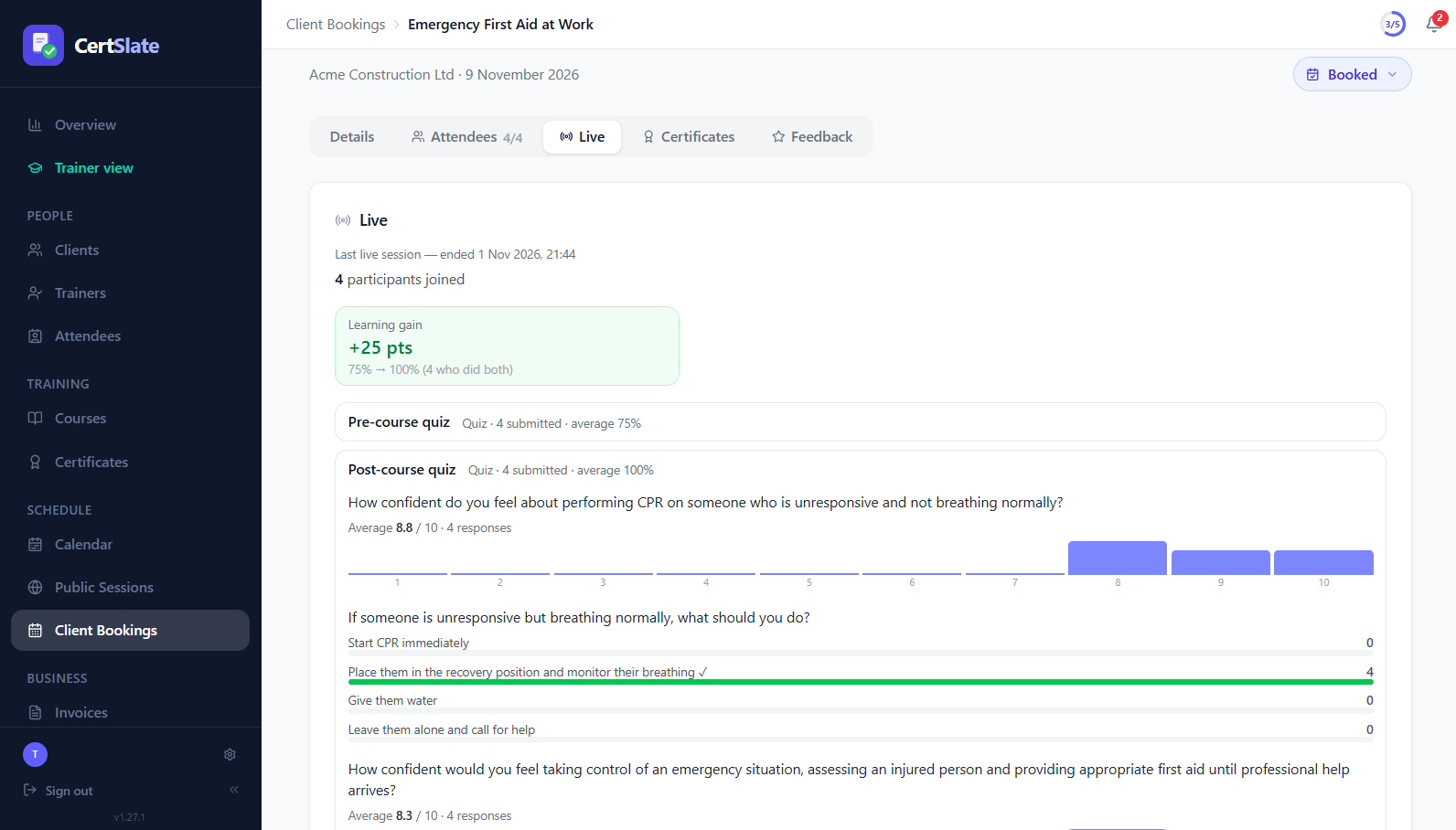
Pre vs post scores, learning gain, confidence and feedback
How it works
From preparation to results
- 1
Build it on the course
On the course’s Live activities tab, add what you want from a catalogue and drag it into order.
- 2
Start from any session
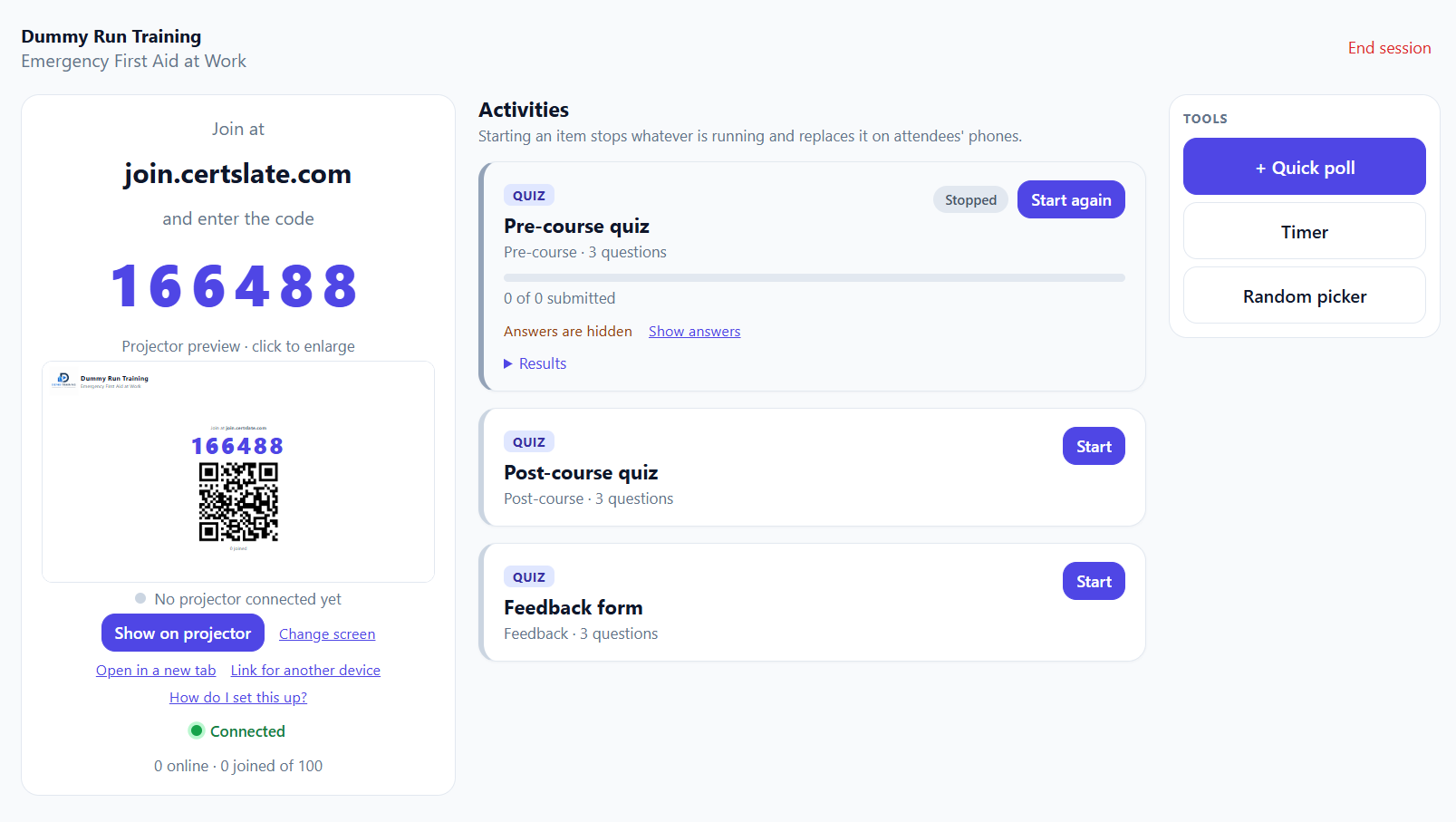
Open a booking or public session and start Live. A presenter console is for you, a clean display is for the projector.
- 3
The room joins
Attendees scan the code on their phones. Nothing to install and no account.
- 4
Results come back
Scores, learning gain, confidence change and feedback are saved to the booking.
The catalogue
A lot to choose from
Mix and match on each course. Each activity has a description and an example to help you pick.
- Pre-course quiz
- Post-course quiz
- Stand-alone quiz
- One question at a time
- Fastest finger
- Confidence check
- Word cloud
- Live Q&A
- Quick poll
- Understanding check
- Feedback form
- Single choice
- Pick several
- True or false
- 1 to 10 rating
Evidence of learning
Show how much the room actually learned
-
Learning gain Run a quiz before and after. CertSlate scores both and shows the change, counting only people who did both.
-
Confidence, before and after Attendees rate how confident they feel from 1 to 10. For practical skills this often says more than a test.
-
Answers with explanations Add an explanation to any question and show it when the answers are revealed. Attendees see only their own result.
In the room
The tools a trainer actually uses
-
A presenter console and a projector viewPreview the screen before you show it, with one-click Show on projector in Chrome and Edge.
-
Ask on the spotMake a quick poll in the moment, or run an understanding check where everyone taps with you, not sure or lost.
-
Group work made easyA countdown timer, a random picker and a group maker.
-
Live Q&AAttendees ask questions anonymously and upvote each other’s, so the best ones rise to the top.
Just for fun
Fastest finger, a race for the room
-
A 3-2-1 countdown, then go Everyone taps the right answer as quickly as they can.
-
A leaderboard on the projector The quickest correct answers appear with names and times, and the top three score a bonus.
-
No pressure afterwards Scores stay in the room. They are not saved to the booking or counted in analytics.
Questions people ask
Do attendees need an app or an account?
No. They scan a QR code or type a 6-digit code, and it opens in their phone’s browser.
Is it included in my plan?
Yes. CertSlate Live is available to every organisation. An admin can turn it off in My Company if you would rather not use it.
Where do the results go?
Back to the booking. They feed your Feedback page, and the analytics views on Pro.
Can attendees see each other’s answers?
Attendees only ever see their own result, with the right answers and explanations, and only when the trainer chooses to show them.
Talk to us
Got questions? Want to know more?
We would love to talk. Leave your number and we will ring you back to answer questions, show you around, or talk through how CertSlate would fit your business.
- A real person, not a sales script
- We aim to reply within one working day
- Happy to do a demo with your own courses in mind
Request a call
Tell us who you are and when suits you.