Client portal
A branded portal your clients will actually use
Your logo and colours, their staff and their compliance. Clients check, book and pay for themselves instead of emailing you.
- Your branding throughout
- You control what clients can do
- Included on every plan
Fewer emails asking “who is out of date?”
Every training company knows the email. A client manager wants to know which of their people need renewing, or needs a copy of a certificate for an inspector, and someone on your team has to go and find it.
The client portal answers those questions without you. Each client manager gets a login to a portal in your colours, where their staff, their certificates, their bookings and their invoices are all in one place.
-
Your brand
Logo, colours, header style, corners and font
-
Their data
Only their own staff, certificates, bookings and invoices
-
Your rules
Switch features on or off for everyone, or for one client
What clients can do
Everything a client manager asks you for, in one login
See compliance at a glance
Who is valid, who is due soon and who is overdue, with filters by status.
Download certificates
Find any certificate, and select several to download in one go.
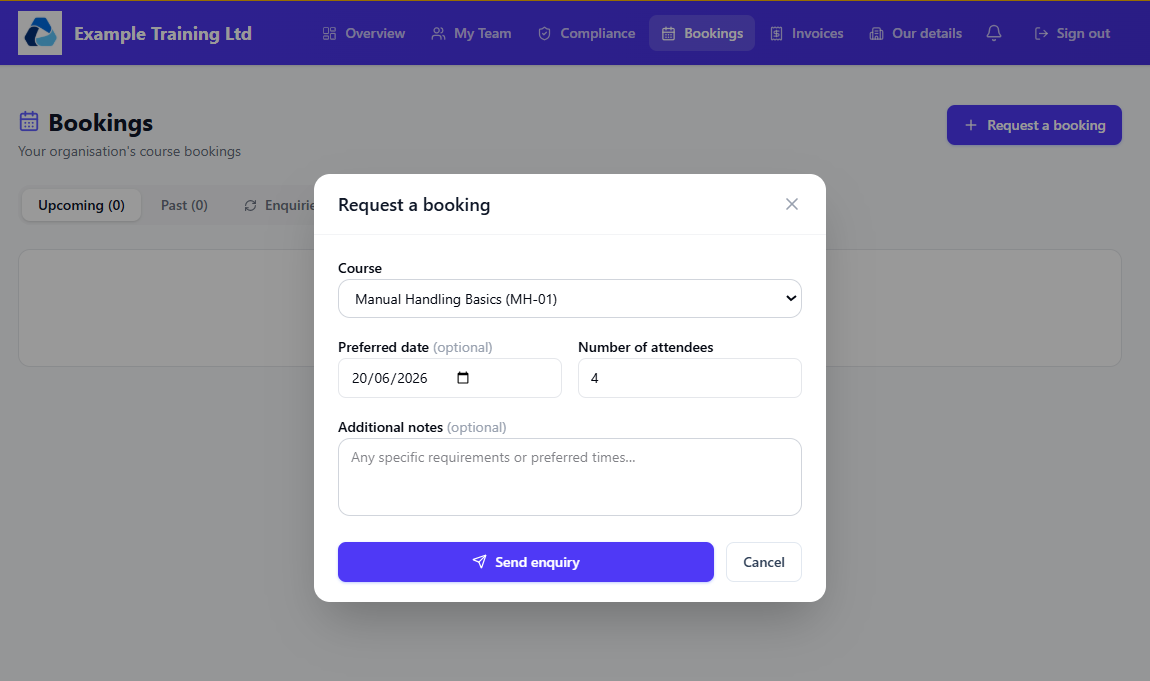
See and request bookings
Upcoming training in one list, and a simple form to ask for more.
Book onto open sessions
Pick from your public sessions, choose which staff go, and the places are confirmed straight away.
View and pay invoices Pro
See what is outstanding and pay by card where you have Stripe connected.
Give feedback
Rate the training and leave comments, which land on your feedback page.
Compliance
The question they ask most, answered before they ask
-
An overview that shows what matters Overdue certificates, training expiring within 30 days, upcoming bookings and outstanding invoices on the first screen.
-
Reminders to the right people Staff and their managers are told before a certificate expires.
-
Training counts, however it was booked Staff who attend your open sessions are linked to their record, so the training still counts towards their company’s compliance.
You are in control
Decide what each client can see and do
Some clients want the lot. Others should only see their certificates. You choose.
-
Company-wide defaults Feedback, team management, booking requests, invoices, organisation details, assigning attendees, and booking onto open sessions.
-
Override for one client Every default can be changed on a single client’s Portal tab.
-
Off means off Switched-off features are hidden and refused behind the scenes. Turn invoices off and amounts are hidden everywhere in the portal.
Getting a client started
From “add client” to logged in
- 1
Add the client and invite a manager
Tick portal access on a staff member and an invitation email goes out. Untick it and their access ends.
- 2
They set up their login
If they have not got round to it, the invite shows as pending and you can resend it in one click.
- 3
Preview it exactly as they see it
View the client portal from the admin side. It is read-only, so you can look around without changing anything.
Pro
Let clients pay their invoices by card
Connect your own Stripe account and clients can pay in the portal. The money goes straight to you.
How payments workQuestions people ask
Is the portal branded with my name?
Yes. It uses your logo, colours, header style and font, with a live preview in settings so you can see it before clients do.
Can I see what a client sees?
Yes. View client portal opens a read-only preview that reflects that client’s own settings, so you can look around safely.
Does the portal cost extra per client?
No. The client portal is part of CertSlate. See the pricing page for plan details.
Can clients upload their own staff?
If you allow it, a client manager can manage their team and import staff from a spreadsheet.
Talk to us
Got questions? Want to know more?
We would love to talk. Leave your number and we will ring you back to answer questions, show you around, or talk through how CertSlate would fit your business.
- A real person, not a sales script
- We aim to reply within one working day
- Happy to do a demo with your own courses in mind
Request a call
Tell us who you are and when suits you.
Give your clients a portal that carries your name
14-day free trial. Cancel anytime.
Start your free trial