Guides
How QR code certificate verification works
Every certificate on the Pro plan includes a unique QR code. Here is how it works for you, your clients, and anyone who needs to verify a certificate is genuine.
8 July 2026
QR code verification is a Pro plan feature. When enabled, every certificate CertSlate generates includes a unique QR code that links to a public verification page. Anyone can scan it to confirm the certificate is genuine — no account or login required.
Why it matters
Employers hire staff based on their qualifications. Site managers check compliance before letting contractors work. Auditors review training records during inspections. In all of these situations, a PDF certificate on its own requires trust. A scannable QR code that links to a live verification record changes that.
The employer scans the code, sees the learner’s name, the course they completed, the date, and whether the certificate is currently valid. There is no way to fake a positive result.
How it works
When CertSlate generates a certificate on the Pro plan, it creates a unique verification URL and prints it as a QR code on the PDF. The URL is specific to that certificate and cannot be reused or transferred.
Scanning the code opens a public verification page that shows:
- The learner’s name
- The course completed
- The completion date and expiry date
- Whether the certificate is currently valid or has expired
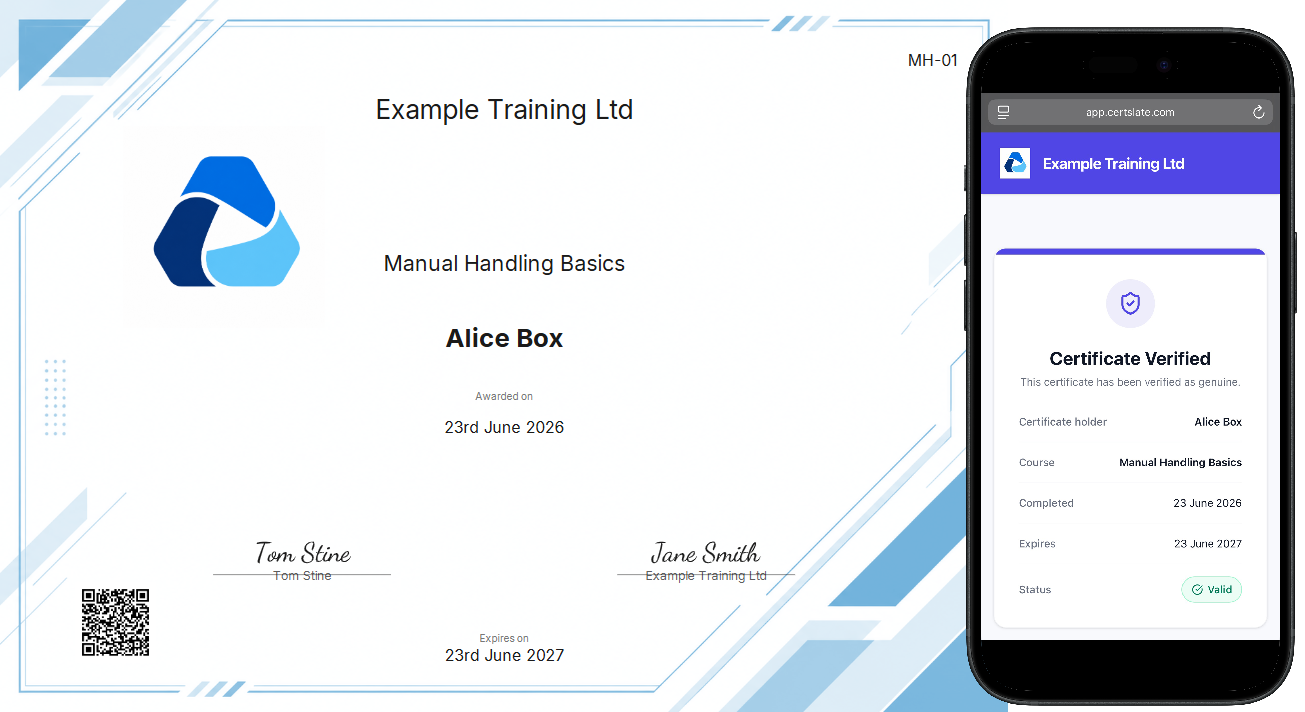
What employers see
The verification page is straightforward. If the certificate is valid, it shows green with the full details. If it has expired, it says so clearly. The page does not show any other information about your clients, other staff members, or your business.
The URL is public but not guessable — it contains a unique identifier that cannot be brute-forced.
Enabling QR codes
QR codes are included automatically on all certificate designs once you are on the Pro plan. No additional setup is needed. Upgrade from Settings > Billing if you are currently on Starter.
Regenerating certificates with QR codes
Certificates generated before your upgrade will not have QR codes attached. To add one, open the relevant booking record, find the staff member, and click Regenerate certificate. The new version will include the QR code and will be emailed to the staff member automatically.
Upgrading to Pro
QR code verification is part of the Pro plan at £99/month, which also includes three trainer seats, up to 10 certificate designs, analytics, custom expiry schedules, and priority support. You can start a 14-day free trial from the signup page.